
Changed your mind about your new device? Find instructions for returning it below.
Important: Do not use the instructions below to return an old device at the end of your Device Return Option commitment period or to mail in a trade-in device. The device will not be processed properly and you may not get your credit. Instead, find the correct steps here:
- Returning a device at the end of your Device Return Option commitment period
- Shipping a device under the trade-in program
To return a newly purchased device
Before returning your newly purchased Bell Mobility device:
- If you activated an eSIM on this device, please transfer the line back to your previous device so you can continue to use your Bell Mobility service.
- Please reset your device to factory defaults to ensure it is clear of your personal information.
Learn how:
- Mobile device (select your device)
- Samsung smartwatch
- Apple Watch
- Fossil smartwatch
Online orders
If you purchased your device online, please follow the steps below to return it, regardless of how you received it (shipped to you or picked up from a store). Items purchased online cannot be returned to a store.
- Put your newly purchased device and all the manuals and accessories it came with into the original box and return it using the packaging we originally sent. If you no longer have the packaging we sent your device in, use another suitable box with proper packaging protection to ship your device back to us.
Important: please follow our instructions on how to safely ship your device or battery.
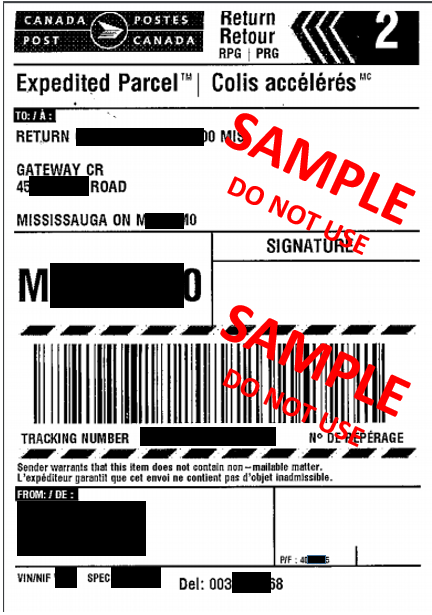
- Once your device is packed up, print a return label from the Canada Post website. Attach the return shipping label to the outside of the box. What does a return label look like?
- If you are unable to print a label, visit any Canada Post outlet and provide the following Post Return ID PR712963. The clerk will print the return label and process your return.
- Please keep track of the return tracking number when returning shipment.
- If you are a Smart/Phone Care customer and need to do a return, please use the enclosed waybill that you received with your shipment. If you no longer have your waybill, please call 1 866 213-2143.
- Once completed, take the package to any Canada Post outlet. There is no need to call us. We will process the return and then send you a confirmation email (processing times may vary).
In-store orders
Devices purchased in a store must be returned to the store where the purchase was made. Products purchased on bell.ca cannot be returned to a store, even if that’s where the order was picked up.
Comments
0 comments
Please sign in to leave a comment.